Prepare for the real situation
Use a coach, your organization’s knowledge, and a clear objective to build context before the simulation starts.
TrainerSim gives every person a private place to practise difficult conversations with lifelike AI—then turns the evidence into coaching, learning pathways, and measurable progress.
Audio or video · Your own AI agents · Private session history
From content to capability
Slides explain. Practice changes behaviour. TrainerSim combines realistic rehearsal, coaching, assessment, and reinforcement so organizations can prepare people without risking a customer, patient, student, deal, or critical moment.
Use a coach, your organization’s knowledge, and a clear objective to build context before the simulation starts.
Speak naturally with audio or video agents that stay in character, ask questions, challenge assumptions, and adapt to the conversation.
Review scores, strengths, improvements, recordings, reports, and the next activity in the learner’s pathway.
The real product
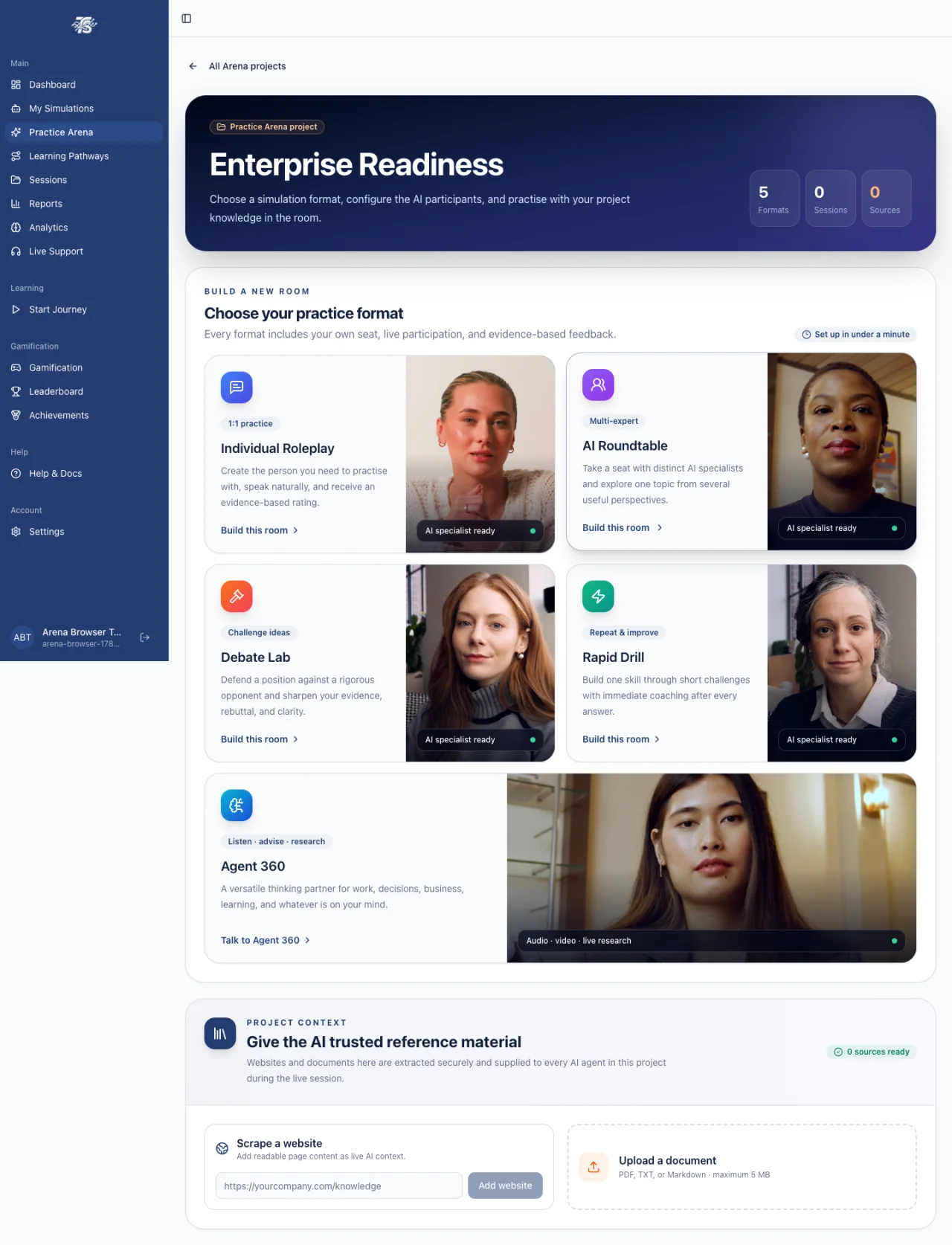
Create a project, add trusted context, choose a format, configure the people in the room, and take your own seat.
Practice Arena
Every format includes the learner’s own seat, audio or avatar video, private evidence, and scored feedback.
1:1 practice
Create the exact customer, colleague, patient, candidate, or stakeholder your learner needs to face—and practise naturally by voice or video.
Multi-expert
Bring distinct AI specialists into one room for panels, seminars, team preparation, and decision support—with the learner in their own seat.
Challenge ideas
Defend a position against a rigorous opponent, strengthen evidence, handle rebuttals, and communicate with greater clarity.
Repeat & improve
Build one skill through short, repeatable challenges and immediate coaching after every response.
Think, plan, research
A listen-first adviser for work, decisions, planning, and country-aware research—available as a natural audio or video conversation.
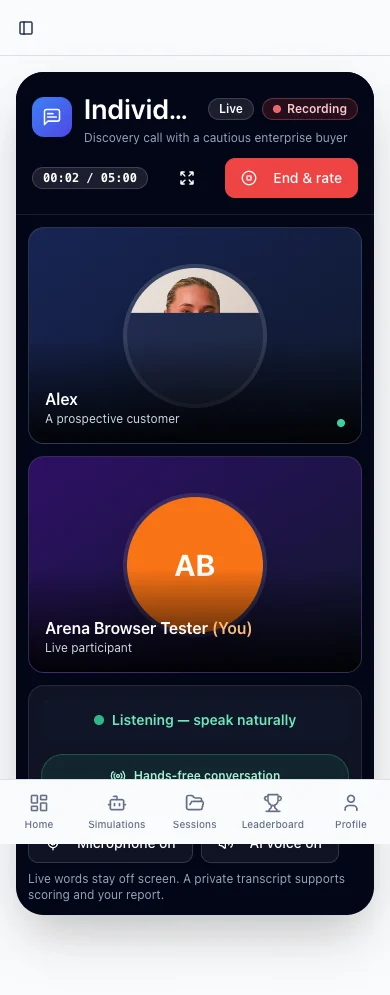
Natural hands-free turns
Actual TrainerSim mobile session
Guided development
Admins publish governed programs. Learners prepare with an AI coach, practise with the assigned simulation, reflect on evidence, and continue through their organization’s pathway.
AI coaching before and after practice
Assigned and self-directed learning journeys
Sequenced pathways with progress and completion
Certificates, achievements, points, and leaderboards
Prepare
Clarify the situation, outcome, and approach.
Practice
Apply the skill with a realistic AI counterpart.
Reflect
Review evidence and choose the next improvement.
Everything connected
From agent creation to replay, TrainerSim gives learners a focused experience and administrators the controls to run it professionally.
Admins create finished audio and video agents with roles, behaviours, difficulty, objectives, custom rubrics, unique portraits, voices, and avatar identities.
Upload PDF, TXT, or Markdown files, scrape approved public web pages, and give every project a bounded source library the AI uses during practice.
One-to-one rooms listen hands-free and respond after the learner pauses. Multi-agent rooms use coordinated turns to keep every voice clear.
Choose efficient voice-first practice or photoreal avatar video. Learners can join with their own photo, microphone, camera, and screen where appropriate.
Custom criteria, strengths, improvements, next steps, and evidence controls turn each conversation into actionable performance feedback.
Audio and video sessions can be recorded privately, separated in history, and replayed through short-lived secure links.
A coach prepares the learner, a simulation tests the skill, and an evidence-based debrief converts the experience into a practical next action.
Publish sequenced learning programs with modules, prerequisites, scores, timing, difficulty, progress, and completion outcomes.
Points, achievements, leaderboards, streaks, and certificates make deliberate practice visible and encourage consistent improvement.
Add chat, voice, or video support to a website. With consent, page-aware guidance and co-browsing help visitors complete the actual step in front of them.
Separate learner and admin experiences, control roles, manage teams, publish training, assign programs, share credits, and apply organization branding.
Serve diverse teams with localized interfaces and multilingual simulation configuration across supported voice and AI providers.
Support on the customer’s screen
Embed a branded support agent that knows your approved knowledge and the visitor’s current page. Offer chat, voice, or avatar video—and, with consent, guide the visitor step by step.

Visitor is on: Billing → Add credits
The agent can explain the page and highlight the next validated control without reading private field values.
Built for real work
A simulation is only useful when it reflects the learner’s job. Configure the role, context, behaviour, language, evidence, and standard for each organization.
Discovery, demos, negotiation, objection handling, renewals, escalation, and executive conversations.
Diagnose issues, practise empathy, follow processes, share screens, and guide customers through real website steps.
Run oral examinations and scenario assessments, apply consistent rubrics, score evidence, and send results when the learner opts in.
Rehearse sensitive conversations, patient communication, service recovery, safeguarding, and professional judgement.
Build decision quality, coaching, management, policy understanding, difficult-conversation skills, and readiness for high-stakes work.
Turn company knowledge into guided pathways and realistic practice that new people can repeat before working with customers.

Responsible enterprise controls
TrainerSim separates member practice from organization administration. Sensitive recordings are private, provider access stays server-side, and performance reporting is based on stored evidence rather than invented demonstration data.
Straightforward plans
Monthly credits are shared securely across your organization. Additional credit packs are available from the billing area.
100 credits monthly
For individuals and small teams building a consistent practice habit.
500 credits monthly
For teams creating their own programs and measuring readiness.
2,000 credits monthly
For organizations scaling governed learning and support workflows.
Plan availability, taxes, currency conversion, and usage requirements are confirmed during checkout. See our Terms of Service.
Questions before launch
TrainerSim uses conversational AI to let people practise realistic workplace situations by audio or video, receive evidence-based feedback, and improve through coaching, pathways, replay, and repeated simulation.
No. Organizations can create simulations for sales, support, onboarding, leadership, education, oral examination, healthcare communication, professional services, compliance, and other conversation-based skills.
Yes. Arena projects and agent knowledge can use approved documents, FAQs, and public website content as bounded context. Administrators control what is uploaded and which simulations use it.
One-to-one roleplay, debate, drill, coaching, and Agent 360 sessions are designed for natural hands-free turns. Roundtable uses hold-to-talk because multiple AI participants must be coordinated safely.
Yes. Session History separates audio and video activity. When recording is enabled, authorized users can replay private recordings through time-limited links and review their scores and feedback.
A secure widget can provide chat, voice, or avatar video assistance. With the visitor’s consent, it can understand the current page, highlight validated visible controls, and support a co-browsing session without collecting form values.
No certification is implied by this website. TrainerSim publishes the safeguards currently implemented and distinguishes them from independent certifications. Enterprise buyers can request current security and vendor information during procurement.
Subscriptions and credit packs are managed through secure Stripe checkout and billing tools. Cancellation affects future renewal; applicable fees, credits, and refund terms are explained in the Terms of Service.
Build your first simulation, explore the full practice platform, or talk with us about an organization rollout.